


Spotify unveils an exclusive mode for ultra-high-fidelity sound, reserved for the most demanding users.

A “bit-perfect” mode for unaltered sound
Discreetly mentioned in a blog post, with this new mode, Spotify offers bit-perfect audio playback.
In practical terms, this means that the audio file is transmitted as is, without any intermediate transformation or processing. The goal is to reproduce the sound exactly as it was mastered by the artist.
Indeed, under normal circumstances, operating systems like Windows can alter the audio signal. This includes resampling, adding system sounds, and adjusting volume. These interventions are often invisible to the user, but can degrade the final quality.
By activating this option, Spotify takes complete control of the PC's audio chain. The audio stream is then sent directly to a digital-to-analog converter (DAC) or an audio interface, bypassing system processing. This results in more faithful reproduction, designed for advanced audio setups.
A feature reserved for specific uses
As its name suggests, "Exclusive Mode" is not intended for all users. To fully benefit from it, you need suitable equipment, such as an external DAC or high-fidelity wired headphones. Bluetooth speakers or built-in speakers are therefore not compatible with this approach, due to signal compression. Spotify also indicates that when this mode is activated, the application monopolizes the selected audio output. Therefore, no other software can play sound simultaneously, and certain features, such as crossfading and automatic mixing, are also disabled.
How to activate Exclusive Mode?
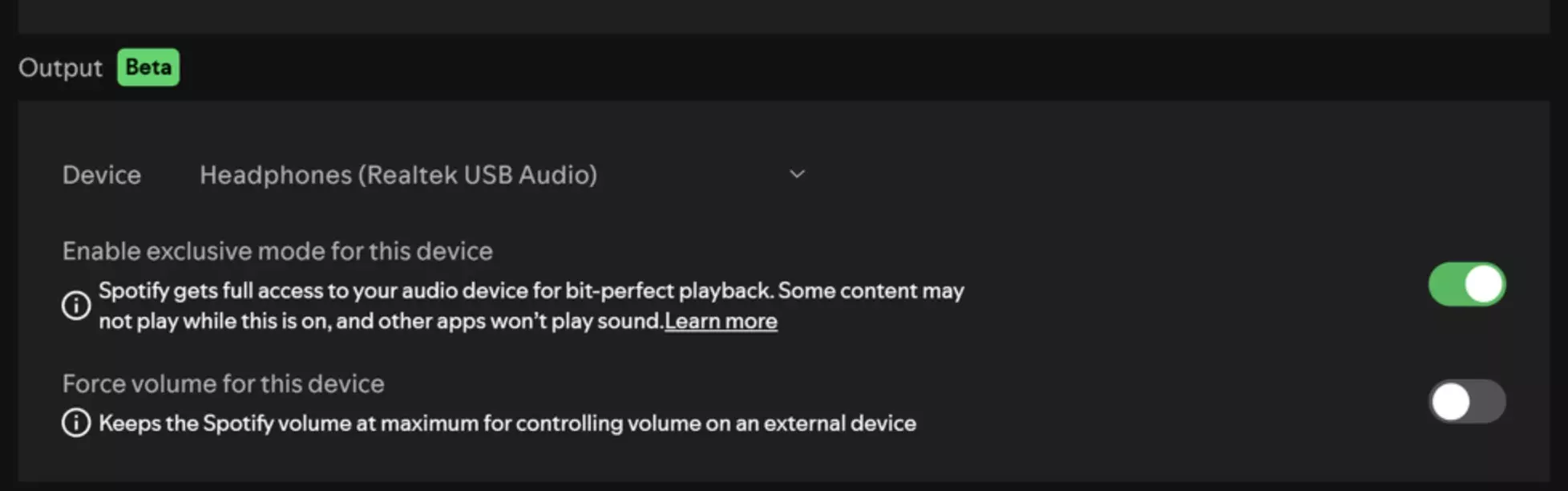
Exclusive Mode is not yet available for all devices – Source: Spotify
To activate this feature, simply go to the playback settings of the Spotify app on Windows, and then select the option in the audio output settings. Spotify also recommends enabling "Lossless" mode for optimal quality.
Currently, this feature is only available on Windows, and a macOS version is planned in a future update, without a specific timeline. Unfortunately, a mobile rollout seems unlikely due to different technical constraints.
Please Login to leave a comment.
Want to Post Your Topic
Join a global community of creators, monetize your content easily. Start your passive income journey with Digbly today!
Post It Now
Comments