iPhone Duo Modes Explained: 6 Ways You Can Use Apple’s New Foldable
- Tags
- iPhone Duo
- Apple
- foldable phone
- Tech News
- iOS
- mobile technology
Introduction to Apple’s Foldable Revolution
If you have exclusively used traditional iPhones throughout your smartphone journey, switching to the new iPhone Duo is bound to feel like a revolutionary shift. While standard smartphones feature a single rigid screen with only two basic viewing orientations—portrait and landscape—foldable devices introduce a whole new layer of versatility and complexity. Apple’s entry into the foldable market doesn't just match its Android competitors; it redefines how users interact with dual-screen form factors through intelligent Hinge State detection.
The iPhone Duo is equipped with sophisticated hardware capable of pinpointing the exact angle of its hinge. This means the operating system can dynamically shift user interfaces, split applications, and optimize media consumption depending on how the device is physically positioned. For newcomers, mastering these varied configurations will unlock the true power of Apple's flagship foldable.
Understanding the Hinge State
At the core of the iPhone Duo's adaptive interface is the 'Hinge State'—the system's real-time awareness of the folding angle. When completely shut at zero degrees, the device restricts activity to the outer cover screen. Fully open at 180 degrees, it shifts entirely to the expansive interior display. Intermediate angles trigger specialized layouts, seamlessly transitioning workflows without missing a beat.
While competing devices like Samsung's Galaxy Z Fold series have experimented with similar concepts like 'Flex Mode,' Apple has deeply integrated Hinge State awareness directly into iOS. This ensures that every software transition feels fluid, intuitive, and purpose-built for productivity and entertainment.
The 6 Distinct iPhone Duo Modes
1. Closed Mode
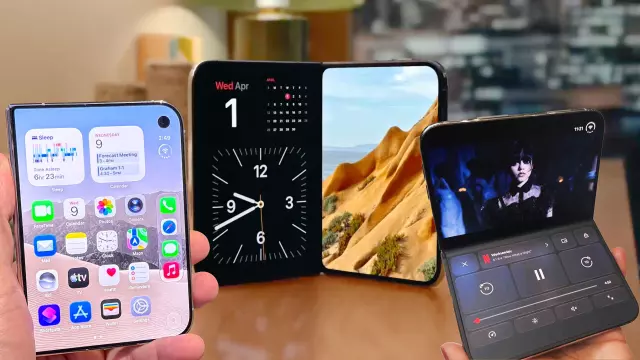
When the hinge is firmly shut, you are greeted by a compact 5.4-inch exterior cover display. Complete with a relocated Dynamic Island and a right-side hole-punch selfie camera, this screen is engineered for swift, on-the-go interactions. Use this mode for checking incoming notifications, replying to quick messages, making quick phone calls, or accessing transit passes via Apple Wallet without ever needing to unfold the device.
2. Open (Horizontal/Landscape) Mode
Unfolding the iPhone Duo completely reveals the magnificent 7.6-inch internal display, which defaults to a sprawling landscape orientation. Akin to a pocket-sized tablet, this configuration is tailor-made for immersive media consumption, high-end gaming, digital canvas drawing, or running two demanding applications side-by-side in Split View. The cleverly placed under-display camera in the upper-right corner also makes landscape video calls and FaceTime sessions feel remarkably natural.
3. Open (Vertical/Portrait) Mode
By rotating the fully unfolded iPhone Duo into a vertical orientation, users gain an entirely different workspace dynamic. The navigation bar shifts intelligently to the bottom, while the taller aspect ratio excels at reading e-books, browsing long-form web articles, and reviewing documents with minimal scrolling. It is also ideal for viewing full-screen vertical video formats like TikTok and Instagram Reels or stacking applications vertically for specialized multitasking tasks.
4. Book Mode (Partially Folded)
Mimicking the posture of an open book, this mode kicks in when the hinge is opened past a 90-degree angle. The operating system actively shifts sensitive UI elements away from the central crease to eliminate visual distortion and make touch interactions effortless. This setup offers a comfortable, ergonomic grip for reading and gives you a convenient physical nook to hold the device securely. Furthermore, propping it down on a flat surface in this orientation lets you automatically engage Apple's StandBy mode.
5. Tabletop Mode (90-Degree Angle Fold)
Tabletop mode transforms your iPhone Duo into a miniature laptop by folding the hinge at a precise 90-degree angle. The software splits application content across the top and bottom screens. This configuration is exceptionally useful for hands-free video conferencing, capturing long-exposure or timed photographs without a tripod, or streaming movies while keeping video controls and live chat windows neatly separated.
6. Tent/Standing Mode
By inverting the device into a sharp 'V' shape and resting it on a flat surface with the exterior display facing outward, you activate Tent Mode. In this state, the large interior screens power down entirely to conserve battery life, while the outer cover display takes over. It’s a brilliant solution for watching media hands-free in cramped spaces, such as an airplane tray table, or utilizing the outer screen as a bedside desk clock.
Conclusion
The iPhone Duo represents a massive leap forward for Apple, proving that software and hardware can harmonize brilliantly in a foldable chassis. By understanding and utilizing these six distinct operational modes, users can maximize productivity, elevate their entertainment experience, and get the absolute most out of Apple’s most innovative device to date.
Comments (0)
Sign in to join the conversation.Sign in
Loading comments...