iPhone Duo Modes Explained: 6 Ways You Can Use Apple’s New Foldable
- Tags
- iPhone Duo
- Apple
- foldable phone
- Tech News
- iOS
Introduction to the iPhone Duo
If you've only ever used standard slab-style iPhones, the iPhone Duo is set to be a revolutionary experience. Traditional smartphones feature a single screen with two basic orientations: portrait and landscape. Foldables, however, introduce a whole new layer of versatility, and Apple's entry into the market is no exception.
The iPhone Duo is equipped with dual screens and advanced hinge-state detection, meaning it recognizes whether the device is fully open, closed, or at a specific partial angle. This hardware intelligence unlocks six distinct operational modes designed to maximize productivity and entertainment.
What is Hinge State?
The core of the iPhone Duo's functionality relies on the Hinge State—the precise angle at which the phone's hinge is positioned. By tracking this angle dynamically, the iOS interface adapts instantly to provide an optimized user experience.
When the hinge is at zero degrees, the phone is closed, routing content to the exterior cover display. At 180 degrees, the device switches entirely to the expansive interior display. Intermediate angles dictate how on-screen elements shift, ensuring optimal visibility and touch accuracy regardless of how the phone is folded.
The 6 iPhone Duo Modes Explained
1. Closed Mode
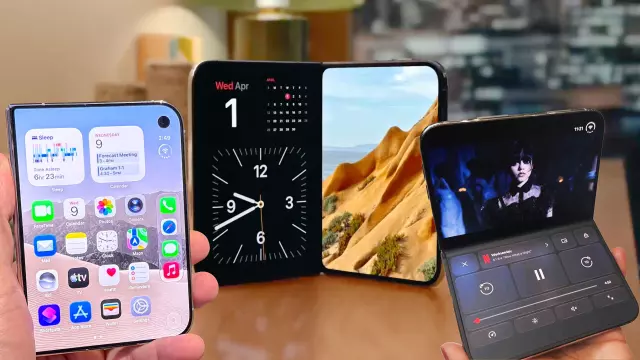
When the hinge is completely shut, the iPhone Duo functions like a compact smartphone using its 5.4-inch exterior cover display. Featuring the Dynamic Island and a repositioned vertical selfie camera, this mode is perfect for quick tasks that don't require maximum screen estate, such as checking notifications, replying to quick texts, answering calls, or using Apple Wallet.
2. Open (Horizontal/Landscape) Mode
Fully unfolding the device reveals a sprawling 7.6-inch display defaulting to a horizontal layout. This mode mimics tablet-like productivity, making it ideal for watching movies, mobile gaming, drawing with an Apple Pencil, or running two apps side-by-side. The under-display camera on the top-right ensures pristine video calling experiences.
3. Open (Vertical/Portrait) Mode
By rotating the fully unfolded iPhone Duo into a vertical orientation, users gain a taller aspect ratio suited for reading e-books, browsing long-form web articles, and reducing scroll fatigue. It also allows for vertical app stacking and better utilization of full-screen vertical video formats like TikTok.
4. Book Mode (Partially Folded)
When the phone is opened past a 90-degree angle resembling an open book, the software detects the physical crease and shifts user interface elements away from the fold to prevent visual distortion. This mode offers a natural reading experience, allows comfortable handling when taking notes, and props up the device on flat surfaces to activate StandBy Mode.
5. Tabletop Mode (90-Degree Angle Fold)
Folding the iPhone Duo at a 90-degree angle turns it into a laptop-like form factor. The interface splits neatly along the crease, allowing for hands-free video conferencing, timed photography, or streaming media while keeping description and comment sections easily reachable on the lower half.
6. Tent/Standing Mode
By folding the device into a 'V' shape and resting it with the exterior display facing outward, the phone enters tent mode. The interior screen shuts off to conserve battery while the outer display takes over, offering a stable, stand-free setup for watching content or displaying widgets via StandBy mode.
Comments (0)
Sign in to join the conversation.Sign in
Loading comments...