iPhone Duo Modes Explained: 6 Ways You Can Use Apple’s New Foldable
- Tags
- iPhone Duo
- Apple
- foldable phone
- Tech News
- iOS
Introduction to the iPhone Duo
If you've only ever used traditional slab-style iPhones, then the iPhone Duo is set to be a completely revolutionary experience. While standard smartphones feature a single screen and operate strictly in portrait or landscape orientations, Apple's first foldable device introduces a new layer of complexity and versatility.
The iPhone Duo is not only equipped with two separate displays, but it is also capable of dynamically detecting its hinge state—recognizing precisely whether the foldable screen is fully or partially open. This capability unlocks a wide variety of usage modes tailored to different scenarios. Far from being intimidating, this adaptability is set to become one of the device's greatest strengths.
Understanding Hinge State and Dynamic Adaptation
At the core of the iPhone Duo's flexibility is its advanced hinge mechanism, which measures the precise angle at which the phone is positioned. By tracking the Hinge State, the device instantly adjusts its user interface to provide an optimized viewing experience.
When closed at zero degrees, content is exclusively displayed on the exterior cover screen. Conversely, opening it fully to 180 degrees shifts the focus entirely to the expansive interior display. Intermediary angles trigger custom software states, allowing the phone to dynamically adapt its layout, much like Samsung's Flex Mode on select Galaxy Z Fold models.
The 6 Distinct Modes of the iPhone Duo
1. Closed Mode
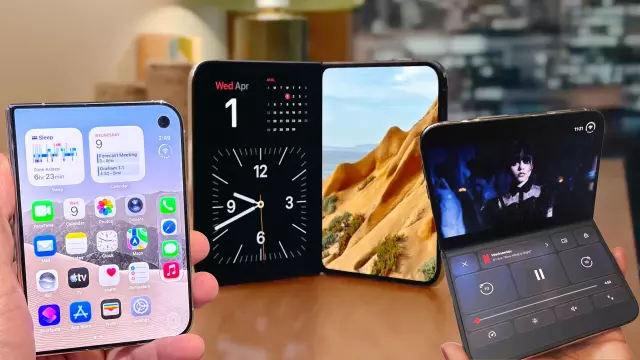
When the hinge is completely shut, users interact with the 5.4-inch exterior cover display. Featuring a vertically shifted Dynamic Island and hole-punch camera system, this mode is ideal for quick tasks that do not require maximum screen estate. You can check notifications, reply to messages rapidly, manage payments via Apple Wallet, or take quick phone calls without ever opening the device.
2. Open (Horizontal/Landscape) Mode
Fully unfolding the device reveals the stunning 7.6-inch interior panel, defaulting to a horizontal landscape orientation. Comparable in size to a small tablet, this mode shines during media consumption, high-end mobile gaming, digital drawing, or running two applications side by side. The discrete under-display camera located in the top-right corner also makes this mode perfect for immersive FaceTime video calls.
3. Open (Vertical/Portrait) Mode
By rotating the fully unfolded iPhone Duo into a vertical portrait orientation, users gain a taller aspect ratio ideal for reading ebooks, browsing long-form web articles, or scrolling through social media feeds like TikTok. This layout shifts navigation bars to the bottom and allows vertical app stacking for advanced multitasking.
4. Book Mode (Partially Folded)
When the phone is opened past a 90-degree angle—resembling an open book—the software actively shifts UI elements away from the central crease to avoid optical distortion. This mode offers a natural reading posture and provides a comfortable center grip, particularly useful when pairing the device with an Apple Pencil. It also enables stable desktop placement to utilize StandBy Mode.
5. Tabletop Mode (90-Degree Angle Fold)
Positioning the iPhone Duo like a miniature laptop at a 90-degree angle divides applications across the crease. This mode acts as its own built-in stand, making it exceptionally useful for hands-free video conferencing, capturing long-exposure photography, or streaming video while keeping live comments or control menus accessible on the lower half.
6. Tent/Standing Mode
Folding the device into a 'V' shape and resting it on a flat surface with the outer display facing outward transforms the iPhone Duo into a tent configuration. In this state, the interior screen powers down to conserve battery, while the outer display takes over, serving as a convenient desk clock via StandBy mode or an easy media viewer without needing external accessories.
Comments (0)
Sign in to join the conversation.Sign in
Loading comments...