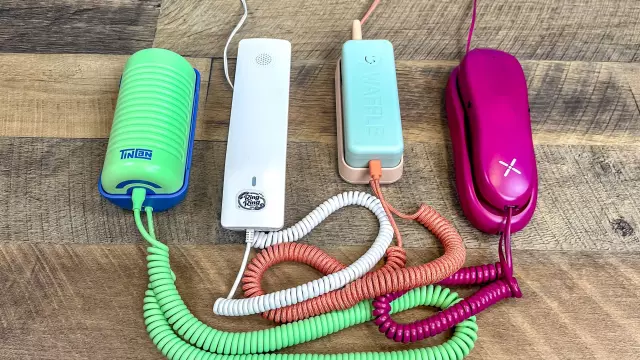
Best Landline Phones for Kids: A Tested Comparison of Pinwheel, Ring Ring, Tin Can, and Waffle
- Tags
- Tech Review
- Parental Controls
- kids phones
- landline for kids
- family safety
In an era dominated by smartphones, many parents are seeking a middle ground to help their children stay connected without the risks of full internet access. Enter the new wave of kid-friendly, VoIP-enabled landline phones. These devices offer a nostalgic design with modern, managed safety features, allowing parents to control who their child calls and when. To determine the best option, I put four leading models through their paces: Pinwheel, Ring Ring, Tin Can, and the newly released Waffle.
Design and Hardware
Hardware design is crucial when marketing to kids. The Tin Can phones stand out for their vibrant, fun, and colorful aesthetic, making them a hit with younger children. The handset, however, is quite wide, which may be challenging for smaller hands to grip. In contrast, the Waffle phone features a slim, ergonomic handset that is easier to hold, along with a unique internal battery that allows for cordless movement between rooms—a standout convenience. Pinwheel offers a more subdued, rounded aesthetic with highly responsive buttons, though the base unit can be tricky to dock. Ring Ring opts for a retro, 90s-style landline aesthetic that may appeal more to parents than children, though it provides excellent wall-mounting options.
Parental Controls and App Ecosystem
Safety is the primary selling point of these devices. The Ring Ring app is arguably the most user-friendly, offering granular control, easy contact management, and the ability to set daily talk-time caps—ranging from 15 to 240 minutes. It also includes helpful features like missed call logs and voicemail access. Tin Can’s app is similarly easy to use but lacks the advanced features found in Ring Ring. Pinwheel utilizes a broader app platform that also manages its mobile devices, which can make its interface for landline-only users feel cluttered and complex. Waffle offers simple, effective control, including a visual caller ID that shows names via an LED display, a feature lacking in its competitors.
Setup and Ease of Use
Setting up these devices ranges from plug-and-play to slightly involved. Tin Can and Waffle offer the most seamless setup experiences. Ring Ring, however, requires an initial Ethernet connection to the router for configuration, which can be an annoyance for some users. Pinwheel’s setup process is similarly complex, requiring several steps including network switching and QR code scanning.
Subscription Pricing
Cost is a significant factor. While all four companies offer basic functionality for free (often limited to peer-to-peer calling within the service), paid plans unlock wider connectivity. Pinwheel offers the most flexible pricing with tiered plans, whereas Tin Can and Waffle are generally more expensive with fewer discount options. Tin Can does offer a tiered discount for buying multiple handsets, making it an attractive choice for families setting up multiple stations.
The Final Verdict
After extensive testing, Tin Can emerges as the top-scoring device for its winning combination of design and simplicity, despite its higher price point. Ring Ring secures a strong second place, offering the best value and superior parental controls. Pinwheel and Waffle round out the list, providing solid alternatives depending on whether you prioritize price (Pinwheel) or premium features like caller ID and battery-powered portability (Waffle).
Comments (0)
Sign in to join the conversation.Sign in
Loading comments...