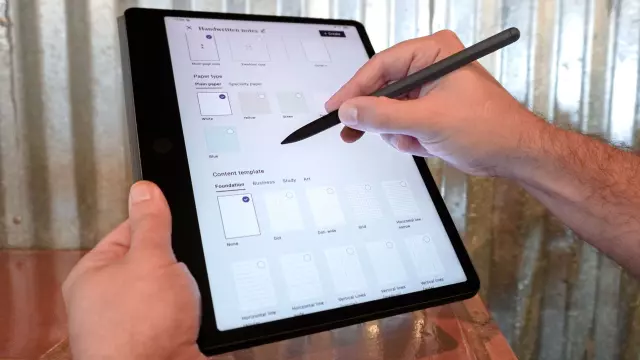
I finally found a tablet with a paper-like display that’s perfect for productivity without the distractions
- Tags
- Tech Reviews
- TCL
- Android Tablets
- E-Readers
- Tablets
When my phone’s screen isn’t large enough for the task at hand, I often reach for a tablet instead. However, unless you charge yours religiously every night, picking one up usually means finding a dead battery and a digital paperweight. Over the years, I’ve tested many of the best tablets — from a compact, gaming-focused slate to a massive 14-inch one that felt more like a clipboard than something you could easily slide into a bag. Yet of all the devices I’ve used, only one ever solved the constant battery-drain dilemma.
A Display-First Approach
After testing out TCL's full-featured NXTPAPER tablets, I recently got my hands on the new TCL Note A1. Unlike those general-purpose slates, this one is built entirely around reading, writing, and taking notes with its included T-Pen Pro stylus. After using the Note A1 for the past three weeks, it’s become the only tablet I reach for at my desk — and the one I slip into my backpack whenever I leave the house. If you’ve had your eyes on a productivity-focused slate from reMarkable, Boox, or even Amazon’s Kindle Scribe, the TCL Note A1 deserves a spot on your shortlist.
The Note A1 gives you plenty of screen space to work with in an incredibly slim package. At 500 grams or just over a pound, it is designed to be easy to carry and take with you anywhere. The device features an 11.5-inch NXTPAPER Pure display with a 3:2 aspect ratio and matte anti-glare glass, powered by an efficient MediaTek Helio G100 processor with 8GB of RAM and 256GB of storage. It also includes an 8,000 mAh battery with 33W fast charging.
Not Your Typical Tablet
Instead of completely reinventing the wheel, TCL took many of the best aspects of its NXTPAPER tablets and incorporated them into the Note A1. You get that matte, paper-like quality from the tablet, which makes reading ebooks and documents a very satisfying experience that’s also easy on the eyes. The display is flicker-free and buttery smooth thanks to its 120Hz refresh rate, meaning you won’t see any of the typical lag you do on an E-Ink screen.
The device’s main page is actually built around notes, letting you view existing files or create new ones instantly. Powered by a streamlined Android skin, it offers a distraction-free user interface that helps combat doom-scrolling. You also get access to TCL’s AI tools for transcription and translation, with features like Inspiration Circle allowing you to long-press the T-Pen Pro stylus button to circle notes and save them to a dedicated space. Unlike reMarkable's E-Ink tablets, you can download standard Google apps and productivity tools directly from the Play Store.
A Tablet Worth Keeping Handy
Over the course of three weeks, the Note A1's battery life continued to wow me as my daily driver. It never ran out of battery or completely died, and even after leaving it untouched for a few days, it stayed well above 30%. This exceptional battery longevity, combined with its distraction-free UI, paper-like matte display, and robust note-taking ecosystem, makes the TCL Note A1 an indispensable productivity tool.
Comments (0)
Sign in to join the conversation.Sign in
Loading comments...