Hidden iPhone Duo StandBy Features Uncovered: Could It Be a Smart Home Display?
- Tags
- iPhone Duo
- Apple
- foldable phone
- iOS
- Smart Home
- StandBy mode
- Tech leak
Even after Apple officially introduced the iPhone Duo at its recent launch event, the foldable device continues to surprise users. New evidence found in a deep-dive of the operating system code suggests that Apple is packing hidden capabilities into the phone's StandBy Mode that were not previously disclosed.
Uncovering New StandBy Functionality
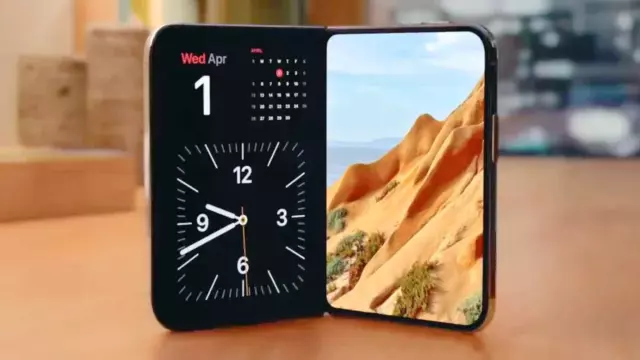
Apple previously confirmed that StandBy mode would be a core feature for the iPhone Duo, emphasizing its accessibility regardless of the phone's physical configuration. Crucially, the Duo supports StandBy even when unplugged—a departure from standard iPhone behavior. However, a code analysis by leaker 'pdfu' reveals that this feature is far more ambitious than just a clock and weather display.
Potential Smart Home Hub Integration
The discovery includes several new StandBy interface faces that hint at a pivot toward smart home management. Among the identified code strings are:
- Home Camera: A widget capable of displaying between one and nine live security feeds.
- Home Modular: An interface optimized for quick access to various smart home accessories.
- Flow: An abstract, animated design for aesthetic ambient display.
- Snoopy: An additional character-based integration, likely following previous Apple/Peanuts collaborations.
These additions suggest that Apple is positioning the foldable form factor of the iPhone Duo as a makeshift smart home hub, potentially bridging the gap between the iPhone and rumors of a dedicated, stationary Apple smart display device, often referred to as 'HomePad'.
Advanced Customization and Layouts
Beyond the functional widgets, the leak highlights a new, sophisticated face editor for StandBy mode, reminiscent of the Apple Watch customization interface. Users can seemingly swipe through various settings to adjust fonts, colors, and complications including calendars and dual clock formats. Furthermore, the discovery of distinct layout configurations—categorized as 'StandBy', 'Stacked', 'Top', 'Middle', and 'Bottom'—implies that the UI dynamically adjusts to the physical orientation and folded state of the device, likely maximizing screen real estate during stationary use.
Comments (0)
Sign in to join the conversation.Sign in
Loading comments...