I Just Tested Windows 11 26H2 — Here’s How to Update Now and Why Microsoft Finally Fixed the Two Worst Things About Windows 11
- Tags
- Tech News
- Microsoft
- Windows 11
- Operating Systems
- Software Updates
Ever since Windows 11 first launched, Microsoft's complete redesign of the desktop interface felt to many users like a sequence of unforced errors. Forcing the taskbar to the bottom permanently broke the long-established workflows of power users and professionals. Meanwhile, the Start menu transformed from a streamlined, efficient app launcher into a bloated behemoth filled with unhelpful pinned applications, widgets, and an aggressive, un-hideable "recommended" feed that frequently felt like free advertising real estate.
Now, the newly released Windows 11 26H2 represents a quiet, decisive retreat from that stubbornness. It marks the first major milestone in Microsoft's recent promise focusing heavily on "performance, reliability, and craft." By finally restoring features that enthusiasts have demanded for years, Microsoft is addressing the core pain points that plagued the operating system since its debut.
How to Get Windows 11 26H2 Now
Updating to the new version is surprisingly seamless. To get started, you need to be running Windows 11 version 24H2 or 25H2. If you check your system's Windows Update page, the update may appear automatically.
However, for certain systems where the update does not show up immediately, users can manually download the official enablement package directly from Microsoft's servers:
- Download for Intel and AMD systems
- Download for Snapdragon and other ARM PCs
Unlike traditional bulky ISO downloads, enablement packages function by simply flipping internal software switches for features already lying dormant inside the OS. This means the download file is tiny, and the installation process takes only moments rather than a disruptive 45-minute overhaul.
Core Breakthroughs in 26H2
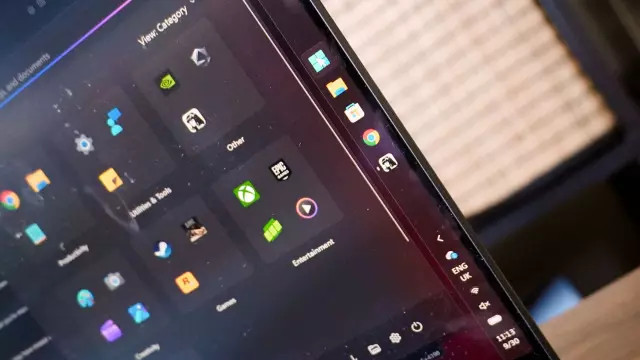
The Return of the Vertical Taskbar
On modern 16:10 laptop panels and ultra-wide desktop monitors, vertical screen real estate is exceptionally valuable. Docking the taskbar to the left or right side of the screen reclaims vital depth for web browsing, coding, and document editing. Furthermore, system tray items adapt cleanly into the slender vertical strip, keeping your main workspace clutter-free.
Granular Start Menu De-cluttering
Navigating the Start menu has long been a frustration for traditional Windows users. The 26H2 update introduces robust Start menu personalization options, allowing you to completely strip away the unwanted dead space, recommendations, and recent items you never asked for.
Resizing and Automated Category View
Users finally gain greater control over the scaling of both the taskbar and the Start menu. Switching to a "small" layout minimizes cavernous dimensions into a compact launcher. Additionally, the new automated category view neatly groups applications by activity type, making app discovery a matter of a single glance rather than an endless search query.
Conclusion
While Microsoft has invested heavily in flashy AI-powered features over recent years, Windows 11 26H2 proves the company is finally listening to feedback regarding core usability. These vital quality-of-life adjustments make this arguably the most impactful update to the operating system yet.
Comments (0)
Sign in to join the conversation.Sign in
Loading comments...