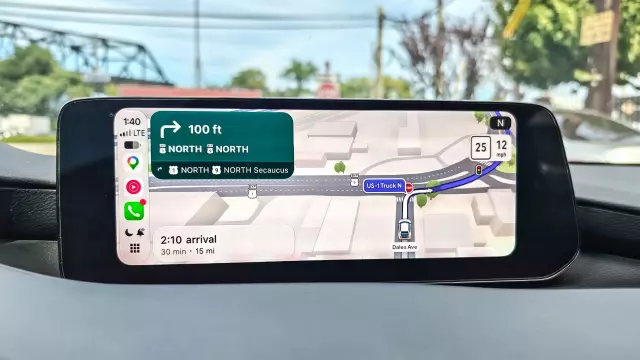
I Tested Google Maps Immersive Navigation for 2 Weeks — And It Makes Tricky Exits a Breeze
- Tags
- Tech Reviews
- Vehicle Tech
- Google Maps
- Apple CarPlay
- Android Auto
- Navigation Apps
Introduction to Google Maps Immersive Navigation
Driving about 300 miles a week while testing new vehicles leaves little room for navigational errors. Throughout numerous vehicle reviews evaluating everything from electric cars to compact SUVs, one application has remained a constant companion: Google Maps. Having tested alternative mapping platforms like Apple Maps, Waze, and TomTom over the past year, the return to Google's ecosystem is nearly always guaranteed.
The arrival of Google Maps Immersive Navigation further solidifies its position as the most comprehensive mapping experience available today. Now fully operational and accessible on both Android Auto and Apple CarPlay, this feature tackles one of driving's most persistent headaches: navigating complex, split-second freeway exits and chaotic multi-lane merges with absolute confidence.
Real Depth and Elevation for Complex Interchanges
Navigating unfamiliar territory during heavy traffic conditions typically spikes driving anxiety, especially when approaching sudden highway splits and overlapping overpasses. Well-traveled local routes such as the Garden State Parkway and the New Jersey Turnpike can easily become overwhelming during peak commute hours, but Immersive Navigation noticeably cuts through the visual clutter.
Unlike traditional flat 2D mapping layouts, the updated 3D map rendering engine displays the surrounding environment with genuine depth, elevation, and architectural context. This visual upgrade extends beyond mere roadside buildings and trees; the actual roadways now reflect true topological depth. Consequently, multi-level highways and elevated flyover ramps are rendered with pristine clarity, instantly removing any ambiguity regarding whether a driver is traveling above or below an intersecting route.
Smart Zoom Dynamically Frames the Road Ahead
During initial commutes into dense urban centers like New York City, sudden display transitions might initially feel jarring. However, these dynamic adjustments are entirely deliberate, engineered specifically to provide drivers with immediate, contextual situational awareness.
While standard in-car navigation interfaces maintain a rigid, static field of view, Google’s dynamic "smart zooms" adapt fluidly to the driving environment. When cruising along an open, straightforward multi-mile stretch of highway, the camera smoothly pulls back into a bird's-eye perspective, offering a broad overview of traffic flow far ahead. This macro view provides advanced notice if upcoming traffic transitions from free-flowing to congested, allowing drivers plenty of time to evaluate alternative routes.
Conversely, when precision is paramount—such as navigating an intricate off-ramp, a tight cloverleaf interchange, or a multi-lane highway merge—the camera automatically punches in close. This focused framing eliminates guesswork during lane positioning, ensuring drivers never overshoot critical turns regardless of whether they are dealing with heavy gridlock or fast-moving traffic.
A Cross-Platform Ecosystem Advantage
Beyond visual enhancements and dynamic scaling, Immersive Navigation thrives on its underlying data infrastructure. Real-time traffic engine updates consistently pinpoint congestion points early, suggesting dynamic rerouting strategies that save valuable time during daily commutes. When combined with reliable speed-trap warnings and crowd-sourced hazard alerts, the driving experience remains peerless.
Crucially, Immersive Navigation is not restricted to a singular hardware ecosystem. Its seamless integration across Apple CarPlay, Android Auto, and standalone mobile applications ensures that drivers switching between iOS and Android devices enjoy a consistent, elevated navigation standard across every journey.
Comments (0)
Sign in to join the conversation.Sign in
Loading comments...