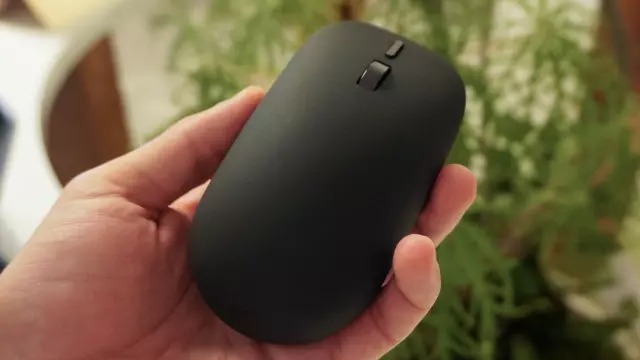
I Tried Microsoft’s New Haptic Surface Mouse — Standard Mice Now Feel Completely Broken to Me
- Tags
- Tech News
- Microsoft
- Surface Mouse
- haptic feedback
- peripherals
Introduction
When Microsoft introduced its new Surface lineup at the Snapdragon Summit, tech enthusiasts naturally gravitated toward the silicon and displays—specifically fawning over the new Surface Pro and Surface Laptop powered by the Snapdragon X2 Plus chips. However, tucked quietly among the powerful new hardware was a peripheral that might just be the most significant announcement of the entire event: the redesigned $79 Surface Mouse.
Beyond its eco-friendly credentials—boasting a 30% recycled chassis—its comfortable ambidextrous silhouette, and a dedicated action button, the standout feature of this new mouse is its integrated haptic feedback. It doesn’t just click; it actually communicates with you as you work.
Closing the Tactile Feedback Loop
For decades, the computer mouse has been an entirely one-way transmission line. Your hand performs an input by clicking or dragging, and your eyes watch the screen to confirm the result. While trackpads have long experimented with haptics to mimic mechanical switches, standalone desktop mice have largely remained hollow plastic shells bound to rigid microswitches.
The new Surface Mouse transforms that relationship into a genuine two-way conversation through subtle, game-changing haptic responses across everyday workflows:
- Window Snapping: When you drag a browser window toward the edge of your screen, the mouse body delivers a subtle tactile bump the exact moment Windows 11 snaps the pane into place, injecting physical liveliness into the operating system's interface.
- Object Alignment: Slide an element across any Microsoft Office application or Adobe’s Creative Suite, and you will physically feel a micro-tick when the shape locks onto an alignment guide or center axis. This feature is particularly revolutionary for users who struggle with alignment and pixel perfection.
- Tactile Verification: Instead of guessing whether a click registered successfully inside a laggy software pipeline, the internal haptic actuator provides an instant physical confirmation directly under your palm, assuring you that the machine has acknowledged your command even under heavy computational loads.
The Real-World Takeaway
Haptic feedback in a mouse can easily sound like a marketing gimmick on a spec sheet. Similar implementations in high-end devices like the Logitech MX Master 4 feel pleasant, but rarely alter how you actually work. However, in real-world productivity workflows, Microsoft’s Surface Mouse is genuinely transformative. By offloading visual verification to your fingertips, it shaves precious seconds off repetitive layout and alignment tasks.
While flashy additions like the dedicated Copilot key might grab the initial headlines, the tactile dialogue engineered inside the new Surface Mouse proves to be the true game-changer for desktop productivity.
Comments (0)
Sign in to join the conversation.Sign in
Loading comments...