iPhone 18 Pro Variable Aperture Lens Added to Apple's Final Cut Camera — How It Works
- Tags
- Apple
- iPhone 18 Pro
- Tech News
- Final Cut Camera
- Mobile Video
Introduction to Final Cut Camera and the iPhone 18 Pro
For videographers and content creators looking to elevate their mobile production quality, Apple's Final Cut Camera app stands out as an essential tool. Offering a suite of advanced recording, exposure control, and monitoring options typically reserved for professional cinema cameras, it extends far beyond the capabilities of the standard iOS Camera app. With the release of the iPhone 18 Pro and Pro Max, Apple has taken this professional suite a step further by launching a major update that brings full support for the new physical variable aperture lens.
Understanding Final Cut Camera's Pro Capabilities
While the native iOS Camera application is fantastic for quick, casual clips featuring standard HDR/SDR recording, slow motion, and Cinematic mode, it often falls short when creators demand granular, manual adjustments. Final Cut Camera addresses this by placing professional parameters front and center. The app allows users to seamlessly swap between exposure modes, fine-tune frame rates, select distinct color profiles, and alter encoding formats. Additionally, it supports multicam recording, enabling seamless synchronization across multiple iPhones for multi-angle shoots.
What's New in Version 2.4
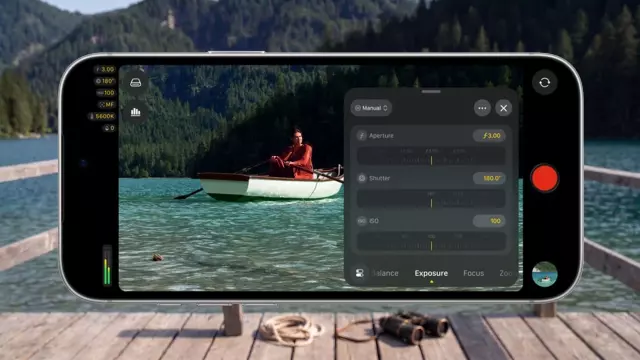
Version 2.4 introduces a revamped user interface designed to maximize efficiency on set. Creators now have rapid access to critical settings such as shutter angle, ISO, and white balance through customizable, non-obtrusive overlays. New additions include a helpful recording tally light indicator and a clever two-finger tap gesture that instantly clears the viewfinder interface for an unobstructed view of the frame.
Most importantly, version 2.4 introduces deep integration with the groundbreaking variable aperture lens built into the iPhone 18 Pro models. Videographers can now manually dial in specific aperture settings or rely on dedicated shutter-priority and aperture-priority exposure modes to control depth of field on the fly.
Enhanced Editing Workflow and Advanced Pro Tools
The update also bridges the gap between capture and post-production by expanding Cinematic mode effects to videos recorded in ProRes and Apple Log. This allows editors to adjust focus points and manipulate depth of field directly within Final Cut Pro. Furthermore, with iOS 27, the app gains native support for professional video scopes, clean SDI output, and genlock offset, solidifying the iPhone's status as a legitimate tool for broadcast and cinema environments.
Comments (0)
Sign in to join the conversation.Sign in
Loading comments...