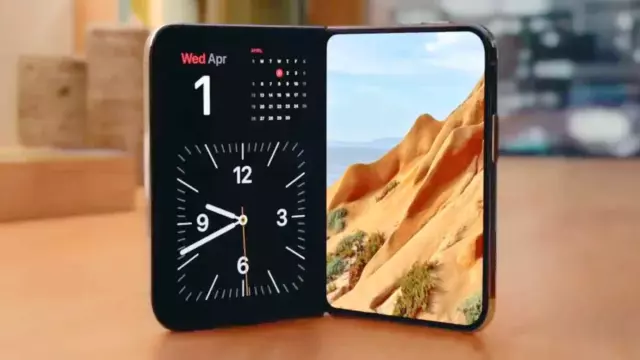
iPhone Duo Leak Reveals Hidden StandBy Details and Smart Home Hub Features
- Tags
- iPhone Duo
- Apple
- Tech News
- iOS
- Smart Home
- StandBy mode
Introduction to the iPhone Duo StandBy Leak
Following Apple's high-profile September launch event, many tech enthusiasts assumed all major details regarding the newly introduced iPhone Duo had been fully revealed. However, a recent deep-dive into the iOS code by leaker pdfu has uncovered a treasure trove of unannounced features, specifically focusing on the device's StandBy mode.
Unlocking New StandBy Capabilities
While Apple initially confirmed that StandBy mode would grace the iPhone Duo—functioning seamlessly across different physical configurations and operating without requiring a constant charging cable connection—code analysis points to much deeper functionality. This unique freedom from a power tether opens up new ways to utilize the foldable device as an ambient information screen.
Fresh StandBy Faces and Smart Home Integration
The code discovery highlights several previously unknown StandBy faces designed specifically for the iPhone Duo form factor. These include:
- Home Camera: Supports anywhere from one to nine live camera feeds simultaneously.
- Home Modular: A dashboard tailored for monitoring smart home accessories.
- Flow: An abstract animated design element.
- Face: A currently mysterious face option.
- Snoopy: An expected character collaboration tying into Peanuts.
These additions heavily suggest that Apple is transforming StandBy mode from a basic bedside clock and weather widget into a comprehensive smart home hub. This bridges the gap nicely with ongoing rumors about Apple's standalone smart display device, tentatively named the HomePad.
Advanced Layouts and Customization
Further code analysis revealed five distinct layout options for the iPhone Duo's StandBy mode: standard StandBy, Stacked, Top, Middle, and Bottom. The latter four appear engineered to maximize the foldable display's unique dimensions. Additionally, a new face editor mimicking the Apple Watch interface allows users to easily swipe through settings, calendars, and digital or analog clock styles.
Comments (0)
Sign in to join the conversation.Sign in
Loading comments...