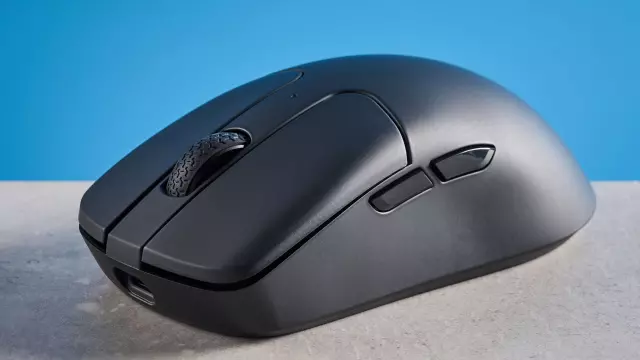
Keychron M2 8K Review: High-End Performance on a Budget
- Tags
- Tech Reviews
- PC Gaming
- Gaming Mouse
- Keychron
- Mouse Review
- Budget Gadgets
Introduction to the Keychron M2 8K
Keychron has long established a reputation for manufacturing high-quality, reliable tech accessories that offer incredible value without compromising on core features. While the brand is heavily associated with mechanical keyboards, its expansion into computer peripherals like wireless gaming mice has been equally impressive. The Keychron M2 8K is a prime example of this philosophy, packing competitive specifications like 8,000Hz polling and an adjustable 30,000 DPI sensor into a budget-friendly form factor.
Priced at just $69 (£54), this lightweight wireless rodent goes head-to-head with some of the most prominent esports mice on the market. However, reaching this attractive price point means certain compromises had to be made. In this comprehensive review, we dive deep into the performance, design, battery life, and software capabilities of the Keychron M2 8K to see how it stacks up against the competition.
Design, Build Quality, and Ergonomics
At first glance, the Keychron M2 8K sports a clean, minimalist right-handed ergonomic design that fits nicely into a variety of setups, whether for gaming or office work. Weighing in at just 1.94 ounces (55 grams), it feels exceptionally light in the hand, allowing for swift, fatigue-free sweeping motions during intense gaming sessions.
However, the build quality reveals a few notable drawbacks. The mouse features an uncoated, smooth ABS plastic shell. While this keeps the weight low, it makes the body feel quite slippery, especially if your palms tend to sweat during high-stakes competitive play. Unfortunately, unlike some of its rivals, Keychron does not include grip tape in the box, meaning users will need to source third-party solutions for a more secure hold. Furthermore, the matte coating acts as a massive fingerprint magnet, accumulating visible smudges within just an hour of use.
Superb Gaming Performance
The true selling point of the Keychron M2 8K is its internal hardware. Featuring an 8,000Hz polling rate and a maximum DPI of 30,000, it delivers lightning-fast responsiveness that rivals mice double or triple its price. During testing across demanding titles like Cyberpunk 2077, Counter-Strike 2, and Lies of P, the mouse registered every command instantaneously without noticeable latency.
The high DPI range allows for precise adjustments depending on the scenario. Dropping the sensitivity to 800 DPI offers incredible stability for long-range headshots, supplemented by the companion app's Angle Snapping feature which straightens out minor hand tremors. Conversely, cranking the DPI up helps navigate fast-paced close-quarter combats seamlessly.
Software and Customization
Customizing the Keychron M2 8K is handled entirely through the web-based Keychron Launcher application. This is a massive win for users who hate installing bloated third-party background software. Operating straight out of a web browser like Google Chrome, the interface is clean, intuitive, and lets users easily remap buttons, adjust polling rates, toggle Angle Snapping, and update firmware with zero hassle.
Battery Life and Connectivity
Equipped with a 600mAh rechargeable battery, the Keychron M2 8K punches well above its weight class in battery longevity. When running at a standard 1,000Hz polling rate, it boasts an impressive rating of up to 140 hours. Unsurprisingly, pushing the mouse to its maximum 8,000Hz polling rate cuts that runtime down to around 40 hours due to the heavy system resource draw, but this remains a very respectable figure for high-polling wireless peripherals.
Connectivity options are versatile, supporting wired connections, a 2.4GHz wireless USB dongle, and Bluetooth 5.3, making it easy to transition between multiple devices on the fly.
The Downsides
Despite its impressive spec sheet, the M2 8K is not without flaws. Beyond the slippery texture and fingerprint-magnet coating, the scroll wheel proves to be a significant point of friction. It features high physical resistance, making it feel heavy, tight, and rigid. While this prevents accidental scrolling, it causes finger fatigue and slows down weapon-switching speed during frantic gaming moments. Additionally, the scroll click itself requires more force than expected.
The Verdict
The Keychron M2 8K is a remarkably capable budget gaming mouse that brings elite features like 8K polling and high DPI tracking to an accessible price point. Its phenomenal battery life, clean web-based customization, and responsive sensor make it a great value option. However, its stiff scroll wheel, slippery finish, and fingerprint-prone body mean that buyers who prioritize tactile comfort and grip might want to explore alternatives like the Keychron M3 Mini V2 or the Lemokey G1.
Comments (0)
Sign in to join the conversation.Sign in
Loading comments...