Mac mini vs. Mac Studio: Which Apple Desktop Should You Choose?
- Tags
- Apple
- Mac Studio
- Desktop Computers
- Mac mini
- Computing
- Tech Guide
Introduction
With the latest iteration of Apple's desktop lineup, the choices have never been more potent yet potentially confusing. Both the updated Mac mini and the powerhouse Mac Studio have arrived, each sporting Apple’s newest M-series silicon. Whether you are a casual user looking for a reliable home office setup or a creative professional pushing the limits of local rendering and AI, knowing which machine fits your workflow is essential.
Understanding the Landscape
The Mac mini M6 and Mac Studio M5 Ultra represent different tiers of computing power. While they may share a similar aesthetic lineage, they are designed for distinct purposes. In this breakdown, we examine the price, design, and performance metrics to help you make an informed investment.
Price: A Tale of Two Budgets
The most immediate difference is the barrier to entry. The Mac mini M6 starts at $899, making it a highly competitive entry point for those stepping into the macOS desktop ecosystem. Conversely, the Mac Studio begins at $2,499 for the M5 Max model, with the M5 Ultra configurations climbing to $5,499. While both offer significant value, the Mac Studio is a professional-grade investment intended for those whose time is literally money.
Design: Form Meets Function
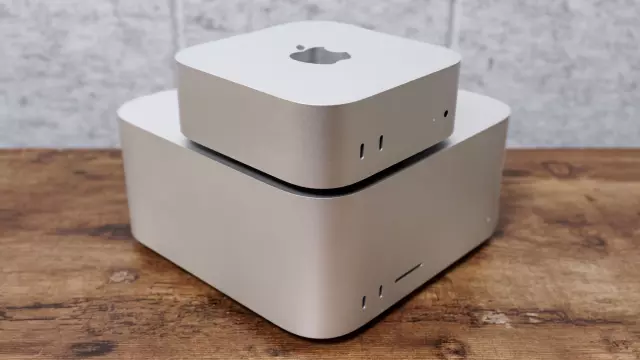
Apple has retained the classic compact designs, but scale matters. The Mac mini remains the ultimate space-saver, measuring just 5 x 5 x 2 inches and weighing a mere 1.5 pounds—fitting easily on any desk or even tucked away behind a monitor. The Mac Studio, at 7.7 x 7.7 x 3.7 inches and weighing 8 pounds, is clearly built for those who require more thermal headroom and connectivity options, including front-facing ports that are vital for quick access to storage and peripherals.
Performance: Power vs. Efficiency
Performance is where the gap widens significantly. For general computing, the M6-powered Mac mini is exceptionally capable. However, the Mac Studio M5 Ultra is a beast, specifically engineered for intensive tasks like 4K/8K video editing, complex 3D modeling, and local AI training. In our tests, while single-core speeds are comparable, the multi-core performance of the M5 Ultra leaves the standard M6 behind, alongside significantly faster SSD read/write speeds that expedite large file workflows.
Final Verdict: Which One to Buy?
Choosing between the two ultimately comes down to your primary use case:
- Buy the Mac mini if: You are a general user, student, or professional whose work doesn't require heavy-duty rendering. It is the best bang-for-your-buck desktop Apple offers.
- Buy the Mac Studio if: You are a creative professional or developer. If your workflow involves massive datasets, high-resolution media production, or local AI model processing, the Mac Studio's superior architecture and thermal management will pay for itself in saved time and increased productivity.
Comments (0)
Sign in to join the conversation.Sign in
Loading comments...